


A guitar display works best when it helps a visitor understand the range before a member of staff begins a long explanation. For a music retailer, that means arranging instruments around useful comparisons rather than filling every available hanger. Body format, size, construction, finish and instrument category should be visible enough for the customer to ask a specific question.
The same structure also helps the sales team. When every model has a clear display role, staff can use a repeatable demonstration instead of relying on personal preference or broad claims. A well-organised store does not need to make every instrument sound identical, nor should it pretend that one short demonstration proves how every example will perform. It needs a fair way to present observable differences and a reliable process for checking the instruments on display.
The clearest in-store method is to compare two or three guitars around one customer decision, show the same verified fields on every card, and control the demonstration setup. Category, size, construction, finish and current condition should be easier to identify than promotional language.
Start with the decisions customers actually make
Before moving any guitars, review the questions visitors ask most often. Some are comparing acoustic and classical instruments. Others already know the category but need to understand size, top construction, finish or an electrical feature. A third group may be looking for a visibly distinctive electric guitar and wants to compare body style, controls and colour.
Write the main questions down and give each display area a job. One area might introduce instrument families. Another might compare two acoustic models with different construction facts. A smaller feature display can show a distinctive finish or a new model without breaking the logic of the main range.
This is more useful than arranging guitars only by arrival date or price. Price matters, but it does not explain why two instruments deserve separate places on the wall.
Keep the first comparison easy to read
Customers should not need to decode a crowded card. A practical comparison label can contain five fields:
brand and model;
instrument type and published size;
top specification;
back and side specification where confirmed;
one visible point such as finish, cutaway or body format.
Additional details can be available in a staff sheet or QR-linked product page. The display card should answer the first question, not reproduce the full catalogue. Use the same terminology online and in store. If the website says “solid spruce top,” the card should not shorten that to “solid wood guitar,” because those descriptions are not interchangeable.
Use the SMIGER GN-81D as a full-size acoustic reference
The SMIGER GN-81D is a useful example of an acoustic reference point. Its published information identifies a 41-inch format and a solid spruce top. Those facts give staff a clear opening: this is a full-size acoustic model, and the top specification can be compared with other published constructions without turning the discussion into an unsupported ranking.
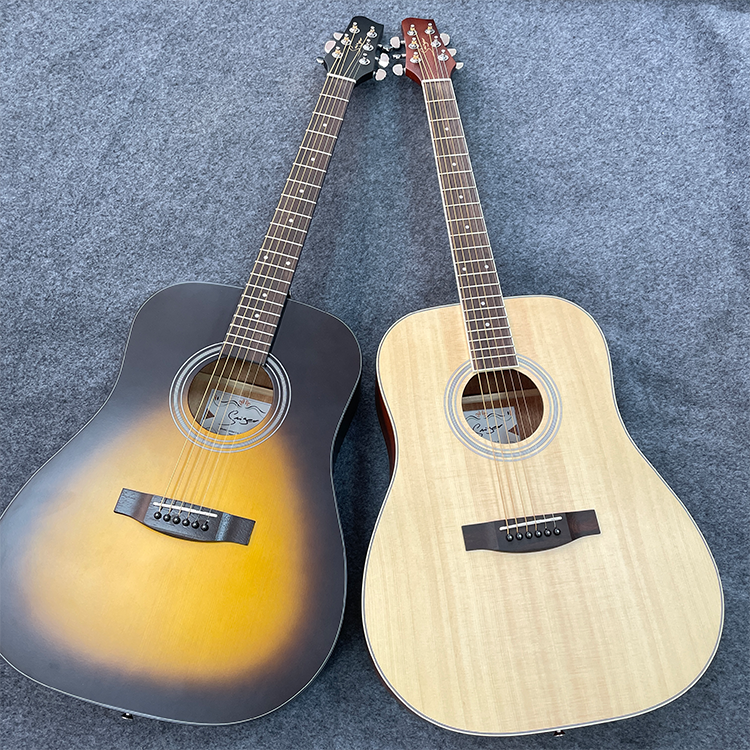
SMIGER GN-81D: a 41-inch solid spruce top acoustic reference for a structured store comparison.
Place the model where a visitor can see the full body and label. If customers may handle it, the store needs a consistent return position and a quick condition check. A reference model loses value when it is out of tune, has visibly worn strings or is returned to the wrong card.
During a demonstration, begin with facts that can be seen and checked. Confirm the size and top specification, then let the customer handle the instrument if store policy allows. Avoid claiming that one construction guarantees a particular result for every player. The comparison should help the visitor notice differences, not pressure them toward a predetermined answer.
Show category contrast with the SMIGER CGM-11
The SMIGER CGM-11 creates a visibly different conversation. The current product record lists a 39-inch thin-body classical format, matte black finish, laminated spruce top, sapele back and sides, and gold classical tuners. These points distinguish it from the GN-81D before either guitar is played.
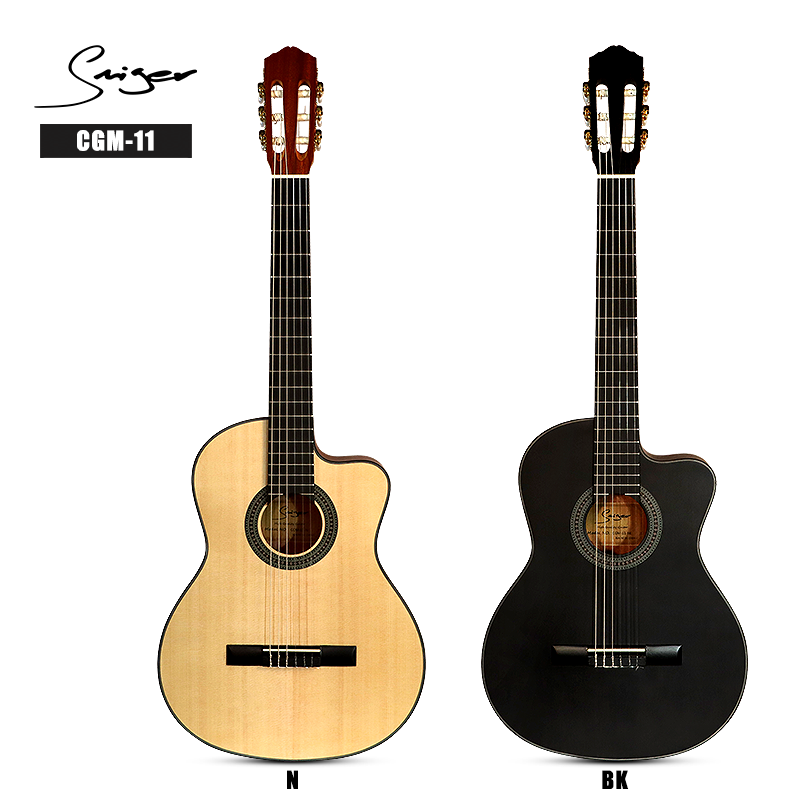
SMIGER CGM-11: a 39-inch thin-body classical model with matte black finish.
Do not place the two instruments beside each other with only a price card. Label one as acoustic and the other as classical, then state the relevant format and construction. Staff should be ready to confirm string type and the current model specification before discussing use.
The matte black finish and thin-body format can support a visual comparison, but they should not be turned into automatic claims about comfort, stage suitability or player level. Let the customer assess the physical format while staff provide the verified facts.
Give distinctive electric guitars their own comparison logic
An electric-guitar display needs different questions from an acoustic comparison. Body style, pickup layout, controls, bridge, neck and finish may all matter. Start with the fields confirmed for the exact model and make them readable.
The LUXARS S-G20 provides a strong visual example through its ST-style format and Shell Pink finish. It can anchor a colour or design-led display while remaining connected to a technical comparison sheet.
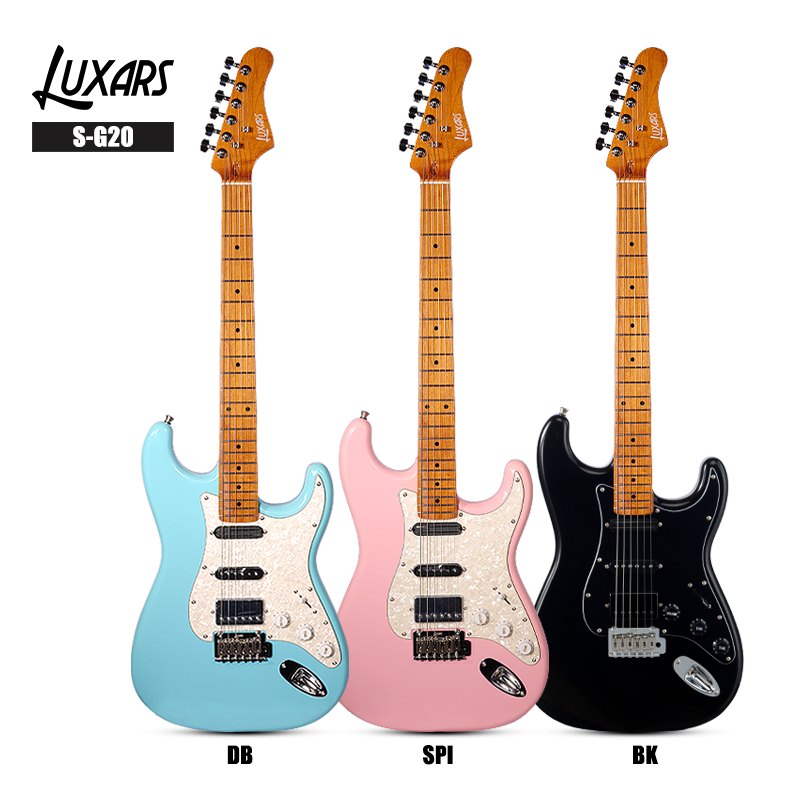
LUXARS S-G20: an ST-style electric guitar in Shell Pink for a distinctive display position.
Colour can attract attention, but the sales conversation should not stop there. The staff sheet should confirm the current pickup and control configuration from the approved product record. The demonstration should use the same amplifier, cable and basic settings when the purpose is to compare guitars. Otherwise the equipment change may influence the customer more than the instrument difference.
Build a comparison card staff can trust
A store card should come from one controlled product record. If a printed label, website page and internal sheet use different facts, staff will eventually repeat the wrong one. Assign one person to approve the fields before a model reaches the floor.
| Display field | GN-81D example | CGM-11 example | S-G20 example |
|---|---|---|---|
| Category | Acoustic guitar | Classical guitar | Electric guitar |
| Published size or format | 41 inch | 39-inch thin body | ST-style format |
| Construction point | Solid spruce top | Laminated spruce top; sapele back and sides | Confirm from current product record |
| Visible point | Full-size acoustic body | Matte black finish; gold classical tuners | Shell Pink finish |
| Staff action | Explain acoustic reference role | Explain category and body-format difference | Use controlled electric demonstration setup |
The table is not a ranking. It shows why each guitar belongs in a different comparison. The same method can be applied to other models as long as every field comes from current, approved information.
Use a repeatable demonstration sequence
Customers should still have room to explore, but staff benefit from a simple sequence:
confirm what the customer wants to compare;
identify the model and category;
point out two or three verified physical differences;
check tuning and basic playing condition;
demonstrate with controlled equipment and settings where relevant;
let the customer respond before adding more information.
This sequence keeps the conversation focused. It also reduces the risk of one staff member describing a model as an entry instrument while another presents it as a stage model without supporting information.
Control the condition of display instruments
The guitar on the wall is also a working sample. Create a short opening and closing check for instruments customers handle regularly. It can cover visible damage, string condition, tuning stability during the day, loose hardware, obvious control noise on electric models and whether the instrument has returned to the correct hanger and label.
Record problems instead of making informal adjustments without a note. If several customers report the same issue, the store needs to know whether the cause is the individual display instrument, its setup, the demonstration equipment or a repeated product concern.
Keep cleaning materials and handling rules appropriate to the published finish. A matte surface and a high-gloss surface should not automatically receive the same treatment without checking the product-care guidance.
Connect the store display with the website
Many customers look online before or after a visit. The product name, category, images and core specifications should match what they saw in the store. A QR code can lead to the exact product page, but only if that page is current and mobile-readable.
Avoid sending a visitor to a broad category page when the card promises details for a specific model. The link should help the customer continue the same comparison. If a specification is under review, update both the card and page rather than relying on staff to explain the discrepancy.
Review the display with evidence
Sales alone do not show whether the display is working. Track which models are handled, which comparisons staff repeat, what details cause confusion and which enquiries require a later answer. A guitar that attracts attention but creates the same unanswered question every week may need a better card rather than a new location.
Review the notes at a fixed interval. Remove duplicated models from the main comparison if they add no clear choice. Move specialist instruments to a labelled feature position. Add stock depth only after the role and demand are understood.
Frequently Asked Questions
How many guitars should be included in one comparison?
Start with two or three models that answer the same customer question or show a clear category difference. Too many instruments make the important fields harder to explain and harder to maintain in consistent condition.
Should guitars be arranged only by price?
No. Price can be one field, but category, size, construction and visible format should explain why the models are being compared. A price-only wall often places unlike instruments together without context.
Can the GN-81D and CGM-11 share a display?
Yes, when the display is designed to compare acoustic and classical categories. Label their different formats and verified construction facts clearly rather than presenting them as direct substitutes.
How should an electric-guitar demonstration be controlled?
Use the same working cable, amplifier and agreed basic settings when comparing instruments. Confirm the exact pickup and control configuration from the current model record before explaining it.
What should staff do when a specification is uncertain?
Pause and check the approved product record. A short verified follow-up is better than an immediate answer that later conflicts with the website or quotation.
Connect Display Quality to Conversion and Profit
Record which guitars are demonstrated, which comparison questions lead to quotations and which display instruments require repeated setup. A strong display reduces explanation time, protects product condition and helps the customer understand why one role deserves a higher price.
Share recurring questions and demonstration results with Vines Music. This information helps improve product selection, specification communication and replenishment instead of treating merchandising as a store-only activity.

Turn Display Evidence into Assortment and Supplier Decisions
A display is not only a presentation surface. It is a source of evidence about which product roles customers understand, which comparisons need staff support and which instruments move from demonstration to sale. Record the result by model and category so that the display can guide assortment depth, replenishment and staff training.
For a business buyer, the useful question is not simply which guitar has the lowest purchase price. The stronger comparison is how clearly the model earns its space, how quickly it becomes sale-ready, how consistently it can be demonstrated and how much unit profit it contributes after service time and slow stock are considered.
| Metric | What it reveals | Decision supported |
|---|---|---|
| Qualified comparison conversations | Whether the display gives customers a clear reason to ask about a model | Clarify the card, position or model role |
| Display-to-demo rate | Whether visual interest becomes meaningful product engagement | Improve placement and staff prompts |
| Demo-to-sale conversion | Whether the comparison supports a confident buying decision | Adjust the range or demonstration sequence |
| Days from display to sale | How display quality connects with inventory rotation | Set stock depth and replenishment timing |
| Repeat condition or specification issue | Whether lost selling time has a recurring operational cause | Share evidence and corrective action with the supplier |
| Unit profit contribution | Margin after display, setup and service effort | Protect profitable roles instead of chasing low price |
Share this evidence with Vines Music as part of a regular range review. SMIGER can support broad, clearly differentiated category roles, while the LUXARS range can add focused electric-guitar differentiation. The right balance depends on local enquiries, conversion and contribution rather than on filling every possible slot.
This turns the supplier relationship into shared problem solving: the retailer contributes store evidence, while the supply partner helps confirm specifications, investigate recurring issues and respond to range gaps. Better information can reduce avoidable handling, accelerate decisions and create a more reliable customer experience.
Related Buyer Guides
Make the display part of the buying process
An effective guitar display gives customers a clear place to begin and gives staff a reliable way to continue the conversation. Define the comparison question, use verified fields, control demonstration conditions and maintain the display instruments as working samples. The result is a store experience that supports a buying decision without depending on slogans.
Use the SMIGER product-range guide and LUXARS electric-guitar range guide when choosing models for a comparison display. To discuss the categories under review, contact Vines Music, email info@vinesmusic.com, or send a WhatsApp message to +86 13826092986.